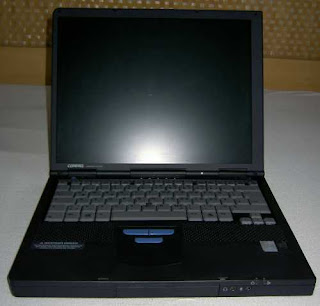
I couldn’t believe my stroke of luck when I found out that I was going to own a notebook computer. I had always wanted one, but I couldn’t seem to convince myself that it was worth spending for. Depreciation has always been my main concern, and that has prevented me from buying myself a notebook.
I only started wanting to own one when it occurred to me that a notebook’s power consumption is about half that of a desktop PC. You see, I pay the electric bills, and because my country’s government has not done anything to ease up that burden, I had to think of a way to increase my personal savings. A notebook was one solution.
My German brother-in-law had actually given the notebook to my brother, who in turn passed it on to me, most likely because he wanted to help me with my situation. I knew that my bro had two notebooks at the time, so I tried my luck and asked for the older of the two. To my surprise, he gave me the newer one. It sure felt like I won the lottery or something.
I couldn’t explain how I felt when I pulled out the notebook from the box. The word “COMPAQ” clearly printed on the box simply elated me. I didn’t care if it was an old model; the thrill of owning a notebook made me forget that.
What made me even luckier was the fact that my brother-in-law, an electronics tech guy who used to work at a Benz factory, took very good care of it. He put in 512Mb of memory, a 20Gb hard drive, and a CD/DVD combo. My M700 came with a docking station and monitor base, an extra LCD monitor, a USB card, a floppy drive, a spare power supply, an extra touchpad, a second 6Gb hard drive (which I plan to house in an enclosure with a USB port), and a backup battery. Even the operating system is an authentic Windows XP Pro. My sister also gave me a wireless mouse, which I really prefer to use instead of the touchpad.
My M700’s processor is a relatively sluggish Pentium III 500, but I turned off all the unnecessary services and used the classic Windows theme. I also removed the desktop wallpaper. In fact, for simple tasks such as doing wordprocessing, using spreadsheets, and watching YouTube videos, this puppy works very well. I sometimes forget what kind of processor it has. Anyway, if I could buy a 1Gb Pentium III board/processor and an English keyboard, everything would be perfect. Yes, everything is in mint condition. It feels like I bought everything brand new a few years ago. Good thing my bro took good care of the M700 too.
Anyway, I love my M700 a lot. I can’t type hard on the keyboard because I don’t want the letters to come off. Yes, even the keyboard is mint; it really looks and feels brand new to me. Looking back at the surplus notebooks and laptops being sold at stores around the city, I can’t imagine how badly treated those tech wonders once were. Seeing all those deep scratches and barely readable letters on the keys of those surplus laptops and notebooks being sold in stores makes me love my notebook even more. I am compelled to take good care of M700 the way its previous owners did.
One added advantage of owning a hand-me-down computer -- or any electronic gadget for that matter -- is the fact that I'm less scared to open it up compared to if it was brand new. In fact, I just got to take off the keyboard and memory modules, and it sure was a great learning experience. I would never take this computer to a technician.
So, if you own an M700, you don't like the idea of paying a technician who could potentially ruin your notebook or steal some parts from it, you're in the mood for some DIY fun, and you promise to be extremely careful, go check out this site that tells you how to disassemble a Compaq Armada.


